
In this article, you will find information about your Go3 account settings and the options you can manage there.
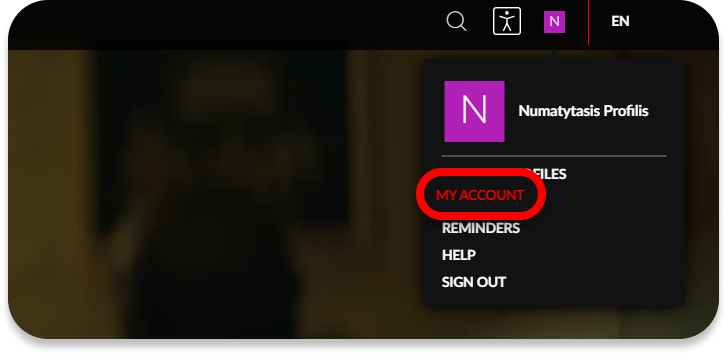
You can access your account settings by clicking your profile picture (in the top right corner) and selecting My Account.
Plan and Payments
In this section, you can view and manage your subscription plan, payment information, and see details about add-on services such as HBO Max, Netflix, or the Adult Channels package.
Payments
By clicking Manage Subscription and Billing, you can:
Invoices and Payments – view your payment history, as well as upcoming and previous payment dates. You can also pay your invoice by clicking Pay Now.
Remove, add, or change your payment method.
Redeem a coupon – If you have a Go3 subscription without a fixed-term contract and have received a discount code, you can activate it by clicking this button.
Invoices and Payments – view your payment history, as well as upcoming and previous payment dates. You can also pay your invoice by clicking Pay Now.
Remove, add, or change your payment method.
Redeem a coupon – If you have a Go3 subscription without a fixed-term contract and have received a discount code, you can activate it by clicking this button.
Plan Information
Here you can find information about your current subscription plan, and if you do not have one, you can order it.
You can also find complete historical information about movie rental periods, titles, payment status, and rental costs in this section. You can also download invoices in PDF format here.
You can also find complete historical information about movie rental periods, titles, payment status, and rental costs in this section. You can also download invoices in PDF format here.
Subscription
In this section of your Go3 account, you can change your contact details, password, PIN code, and notification settings.
Change Email address
If needed, you can change the email address used to log in to your account. You will need to enter your account password, provide a new email address, and confirm it via the email sent to the newly specified address.
Change Phone Number
Adding a Lithuanian phone number is required to use our services while abroad (within EU/EEA countries). If needed, you can change the phone number in self-service or by contacting the Go3 Customer Support team.
Read more about using Go3 services abroad.
Read more about using Go3 services abroad.
Change Password
If needed, you can change your account login password. Enter your current password and the new password that you would like to use going forward.
If you have any questions, we recommend reviewing the detailed Go3 password change instructions.
If you have any questions, we recommend reviewing the detailed Go3 password change instructions.
Change PIN
Here you can change the PIN code used for movie rentals and 18+ age-restricted content.
You can find detailed instructions and more information about the PIN code here.
You can find detailed instructions and more information about the PIN code here.
Notification Settings
Here you can choose what information you would like to receive from Go3.
Read more information on how to change notification settings.
Read more information on how to change notification settings.
My profile
In this section, you can see the devices that are currently signed in to your account.
My Devices
If you want to sign in to a TV using your Go3 account, select Add Device and enter the code displayed on your TV screen. This will link your account to the TV. Please note that you can watch content on two different devices at the same time.
Read more on how to start using Go3 on your TV.
Read more on how to start using Go3 on your TV.